
In this article, we will talk about another Preview Build for Windows 11 26H1, with the Build 28020.1673 or KB5077240 in the Canary Channel.
In the latest Build for the Canary Channel, you may notice the New Windows 11 26H1 Version, which is a New Version that Microsoft is using to test the New Platform for the upcoming Qualcomm Snapdragon X2 Devices and Nvidia N1X Processors.
26H1 is not a feature update for version 25H2 and only includes platform changes to support specific silicon. There is no action required from customers.
25H2 remains the primary place for new features. Windows 11 continues to have an annual feature update cadence, with releases in the second half of the calendar year.
As a reminder, in the Windows Insider Program, new experiences will continue to land first in the Dev and Beta Channels, with Canary primarily focused on platform changes.
New Features in this Build
New Emoji
The Emoji 16.0 releaseintroduces a small thoughtfully curated set of new emojis, one from each major category. Each emoji carries timeless symbolism and practical versatility. These new emojis now appear in the emoji panel.
Backup and Restore
The first sign-in restore experience is now part of Windows Backup for Organizations, bringing this restore capability to more device types. This experience restores user settings and Microsoft Store apps automatically at first sign-in on Microsoft Entra hybrid joined devices, Cloud PCs, and multi‑user environments. This capability helps create a consistent setup process during device refreshes, upgrades, or migrations.
Quick Machine Recovery
Quick Machine Recovery (QMR) now turns on automatically for enterprise managed Windows Professional devices, as well as Windows Professional devices that are not domain-joined. These devices receive the same recovery features available to Windows Home users. For domain-joined devices, QMR stays off unless it is enabled by the organization.
Taskbar and System Tray
A built‑in network speed test is now available from the taskbar. You can open it from the Wi‑Fi or Cellular Quick Settings, or by right-clicking the network icon in the system tray. The speed test opens in the default browser and measures Ethernet, Wi‑Fi, and cellular connections. This feature helps check network performance and troubleshoot issues.
Start Menu
The account menu on the Start menu now includes a new option that directs you to the benefits page, making it easier to explore and manage your Microsoft account benefits.
Camera Settings
You can control pan and tilt for supported cameras in the Settings app. The controls appear under Settings> Bluetooth & devices > Cameras, in the “Basic settings” section for your selected camera.
Widgets
Widget Settings now open as a full‑page experience in the Widgets app instead of opening in a dialog.
Search on the Taskbar
- Group headers now show the number of results, so you can quickly see when more results are available. Select a group header to see all results for that group and hide results from other groups.
- You can preview search results by hovering over a result and selecting Preview to see the content without opening it.
Remote Server Administration Tools
This update adds support for Remote Server Administration Tools (RSAT) on Windows 11 Arm64 devices. IT administrators can now install and use tools such as Active Directory Domain Services and Lightweight Directory Services Tools, Active Directory Certificate Services Tools, Server Manager, Group Policy Management Tools, DNS Server Tools, and DHCP Server Tools. These tools are available as optional features and can be installed through Settings > System > Optional Features or from Control Panel > Programs > Turn Windows features on or off.
New File Explorer Design
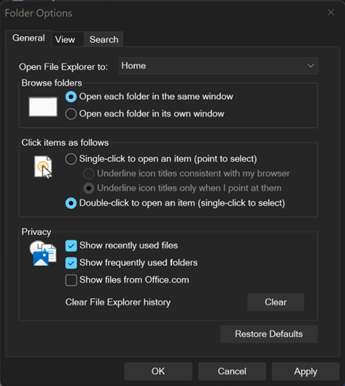
Microsoft is continuing to make improvements to the dark mode experience in File Explorer. You will now see a consistent dark mode experience in the Folder Options dialog.
Fixes in this Build
File Explorer
- Addressed an issue where all File Explorer open windows and tabs might unexpectedly jump to Desktop or Home.
Settings
- Improved reliability of configuring options in Settings > Bluetooth & Devices > Wheel.
Nearby Sharing
- Improved the reliability of sending larger files using nearby sharing.
For more information about this Build, you can check this article from the Microsoft Blog.
For a more in-depth presentation of the New Build, you can watch the video below from the youtube channel.
 11
11
 20
20

