
In this article, we will talk about All New Windows K2 Features that were Released so far in May 2026.
Windows K2 is a New Codename for an Internal Microsoft Plan, to fix Windows 11 from the ground up, affecting parts such as Performance, Reliability, AI and more.
These are some of the Features and Changes that have been Released so far, since March 2026.
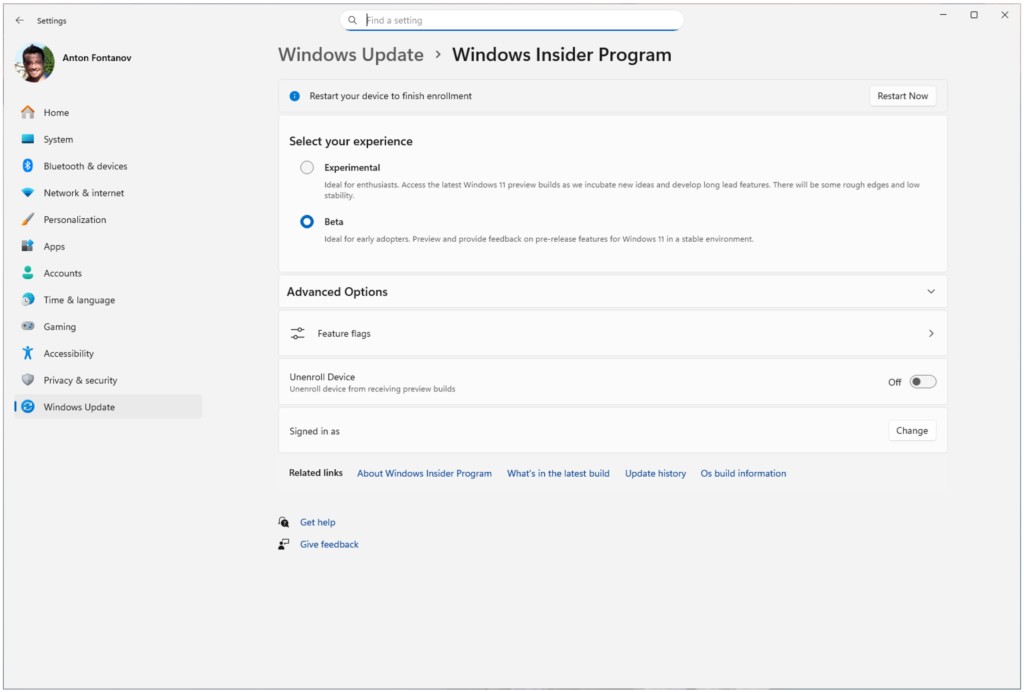
New Windows Insider Program
Microsoft is moving to two primary channels, with the advanced option to pick specific Windows core versions within those. The new channels are Experimental and Beta.
Experimental replaces what were previously the Dev and Canary channels. The name is deliberate: you’re getting early access to features under active development, with the understanding that what you see may change, get delayed, or not ship at all. We’ve heard your feedback that you want to access and contribute to features early in development and this is the channel to do that.
Beta is a refresh of the previous Beta Channel and previews what we plan to ship in the coming weeks. The big change: we’re ending gradual feature rollouts in Beta. When we announce a feature in a Beta update and you take that update, you will have that feature. You may occasionally see small differences within a feature as we test variations, but the feature itself will always be on your device.
If you’re not sure which to pick: Experimental is where new features generally show up first and where your feedback has the most direct impact on what we build. Beta is the better fit if you want a more stable experience with features closer to shipping.
New Windows Update Changes
Microsoft is introducing new capabilities to enhance security and improve user control over the Windows update experience. This includes:
- Ability to skip updates immediately during the out of box experience (OOBE)
- Extend update pauses as many times as you need
- Always available options to shutdown and restart with updating
- More insight on available updates to make more informed installation decisions
AI Removed from Apps
In Snipping Tool and Photos, they’ve removed the “Ask Copilot” button entirely. And in Notepad, they’ve replaced the generic Copilot icon with a clearer “Writing Tools” label that better describes what it does.
File Explorer Changes
Microsoft is making foundational architectural improvements and rolling them out incrementally to reduce hangs, improve responsiveness, polish, and drive consistent gains in performance.
In parallel, they’re addressing long-standing user feedback with targeted improvements that make day-to-day experiences more stable and reliable. This has included fixes to deliver smoother, more responsive launch and navigation, making the Home experience more stable with fewer jarring transitions and improved visual polish, including sharper thumbnails.
New Widgets Changes
Microsoft is working to make Widgets feel less distracting and overwhelming by making the experience quiet by default.
To do this, they’re testing a new set of default settings designed to reduce unexpected alerts and visual interruptions. These changes include:
- Disabling Open on hover by default
- Turning off taskbar badging by default
- Opening to widgets experience on first launch
- Limiting taskbar alerts until you choose to open and engage with the Widgets experience
If you prefer more proactive updates, you can easily turn features like taskbar badging back on through Widgets settings.
Better System Performance
Microsoft have been actively investigating and pursuing memory savings across the system. Widgets is one of the areas they’re focused on, leveraging device characteristics and user behavior patterns to optimize memory for our users. This includes things like a smaller default memory footprint, giving back memory faster when not in use, putting the user in more control of pre-launch, and limiting pre-launch on devices with lower memory capacity.
Microsoft have been improving responsiveness across key OS and app launch experiences. In mid-March, they began rolling out targeted performance/power tuning improvements for the most frequently used OS and app scenarios. While they continue to tune these policies for improvements, these optimizations accelerate app launch and core shell scenarios like the Start menu, Search, Action Center, and more. One other cool update was work the team recently did to update the Windows scheduler. By better handling processor power states (C-states), they improve user-perceived responsiveness in everyday use.
What’s Next
Microsoft is announcing that the Taskbar Customization Options are coming soon in Preview and also more improvements to enhance Search in Windows.
For more information about Windows K2 Features, you can check this article from the Microsoft Blog.
For a more in-depth presentation of these New Windows K2 Features, you can watch the video below from the youtube channel.
 11
11
 20
20

