
In this article, we will talk about some Major Windows 11 App Updates in July 2026 that you can receive as part of the Windows Insider Program.
How to Get All the App Updates
First of all you will need to make sure you are enrolled in the Experimental Channel from the Windows Insider Program and then open Microsoft Store, go to Downloads and Check for Updates.
New Notepad Update
- Formatting is now applied properly when working with both .md and .markdown files.
- Improved support for copying and pasting indented and nested lists.
- Improved support for concurrent print jobs across Notepad windows and tabs.
- Improved launch performance.
- Fixed issue where underscore characters were sometimes rendered incorrectly.
New Calculator Update
- Pressing Clear (C) or Clear Entry (CE) in Scientific mode now properly resets the notation toggle and returns the display to fixed-point form.
- Fixed access key conflict between “Clear all history” (Alt+Y) and “Clear all memory” (Alt+R).
- Improved screen reader support.
New Clock Update
- In Focus Sessions, tasks no longer disappear upon completion.
- Improved accuracy of sunrise and sunset times, especially at high latitudes.
New Media Player Update
- Improved support for local album art for albums without embedded artwork. The app now checks the album folder for common cover image files before searching online, so you’ll see the right artwork more often.
- Disabled libraries now show a “disabled” message instead of appearing empty.
- Improved track list rendering when changing sort order.
New Photos Update
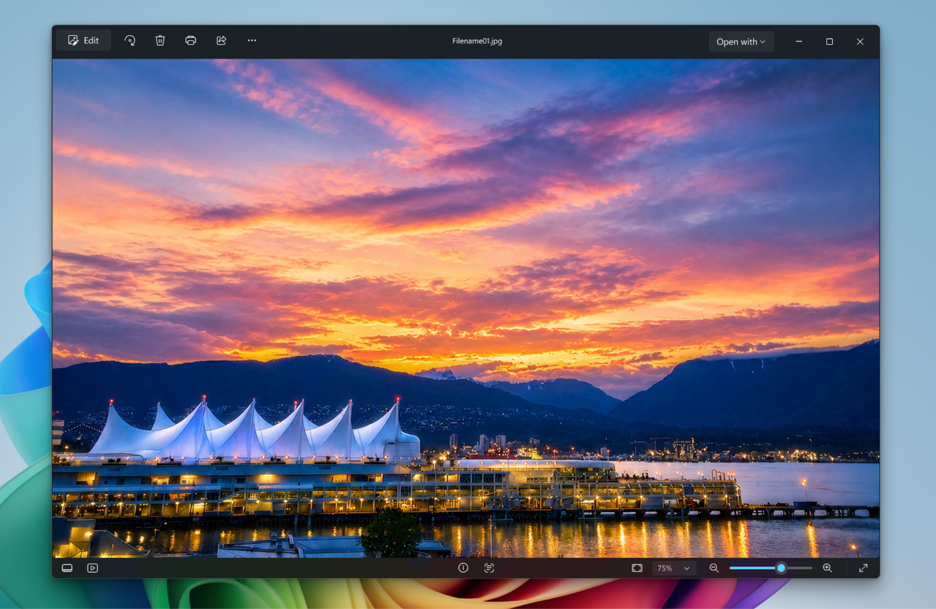
- The photo viewer has a refreshed design that puts the focus on your content and top actions like edit, print, and share.
- The updated file info pane now shows richer details about your photos.
- Added support for saving HEIC files in their original format while editing.
- Added support for viewing SVG files in the photo viewer.
- Improved launch performance when opening and viewing photos.
Photos (Preview)
A new photo gallery experience is now available as “Photos (Preview)” in the app list. Try it out and share feedback directly inside the preview app to help us improve future updates.
For more information about these App Updates, you can check these articles from the Microsoft Blog.
For a more in-depth presentation of the New App Updates, you can watch the video below from the youtube channel.
 11
11
 20
20

