
In this article, we will talk about some of the Recent Reported Windows 11 25H2 Problems, which include Apps Failing to Launch, Lost Background Settings, Mouse Reset, Defender Notifications.
These issues can be encountered in the Windows 11 25H2 Summer Update in the Main Release and Microsoft has finally acknowledged these issues.
Lost Desktop Background
Following installation of Windows updates released August 27 2026 (KB5120998) and later, some Windows Desktop settings fail to load, resulting in desktop backgrounds displaying as a solid black color. It is possible other desktop settings may be affected, such as slideshow settings or contrast themes.
On affected devices, attempting to manually restore customized settings does not work. This is because the issue prevents the correct loading of settings, regardless of their value. In this case, a default black background is used instead.
More information about this Issue, can be found in this Microsoft Article.
Apps Fail to Launch
After installing Windows security updates released on or after August 11, 2026, (KB5121003), Microsoft Teams and the new Outlook for Windows might fail to launch or might close unexpectedly on ARM-based devices, such as Surface Pro 11 and Surface Laptop 7. Classic Outlook, Word, Excel, and other applications are not known to be affected. This issue is most likely to occur on new or freshly imaged PCs that have not yet installed any Microsoft Store updates.
Workaround: To work around this issue:
Open Microsoft Store.
Select Downloads > Check for updates.
Install the latest update for the Auto Super Resolution Package (version 1.0.19.0 or later).
More information about this Issue, can be found in this Microsoft Article.
Mouse Settings Reset
Following installation of Windows updates released August 27 2026 (KB5120998) and later, mouse personalization settings are being reverted to certain standard settings. This includes cursor and cursor animations that are selected in the Mouse Properties options under Windows.
Their investigation indicates that this issue is caused by code components used in non-English Windows installations. In impacted locales, these settings will fail to load, causing a default to be used instead. Attempting to manually restore the settings values is not successful, as the issue prevents loading these settings regardless of their value.
More information about this Issue, can be found in this Microsoft Article.
Broken Defender Notifications
After installing the latest updates for Microsoft Defender Antivirus, notifications might appear stating that “Microsoft Defender Antivirus is turned off,” even though the antivirus is functioning correctly and all settings show it as active. These notifications can appear when Windows starts and intermittently afterward. They persist even if notification settings are turned off.
This issue can be observed in any version of Windows or Windows Server with Microsoft Defender Antivirus running with the latest Defender updates.
More information about this Issue, can be found in this Microsoft Article.
How to Fix
The only way to fix the Broken Mouse Issues for example, is to Uninstall the Update and revert to the Previous One.
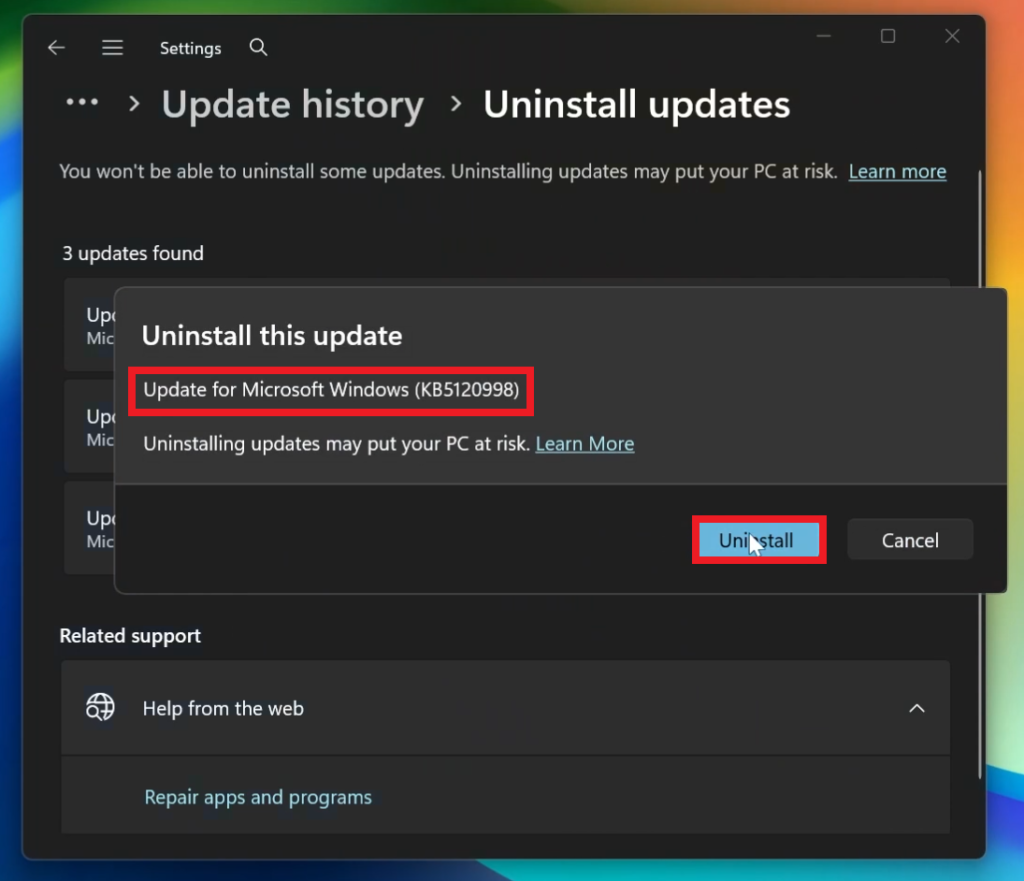
Open Settings, go to Windows Update, go to Update History and then Uninstall Updates.
From there make sure you Uninstall the KB5120998 Update and you should be good to go.
For a more in-depth tutorial, you can watch the video below from the youtube channel.
 11
11
 20
20

