
In this article, we will talk about a New Windows 11 Debloat Method with the latest version of Rufus 4.14.
Rufus has received a New Update, that now allows you to remove Copilot, OneDrive, Outlook and more bloatware from Windows 11. In this article, I will show you how to use it.
For this process, you will need a USB Drive with aprox. 8GB of storage, the Windows 11 ISO and Rufus 4.14.
Make sure to select the USB Drive, the ISO and name the USB Drive. Leave everything as Default and click on Start.
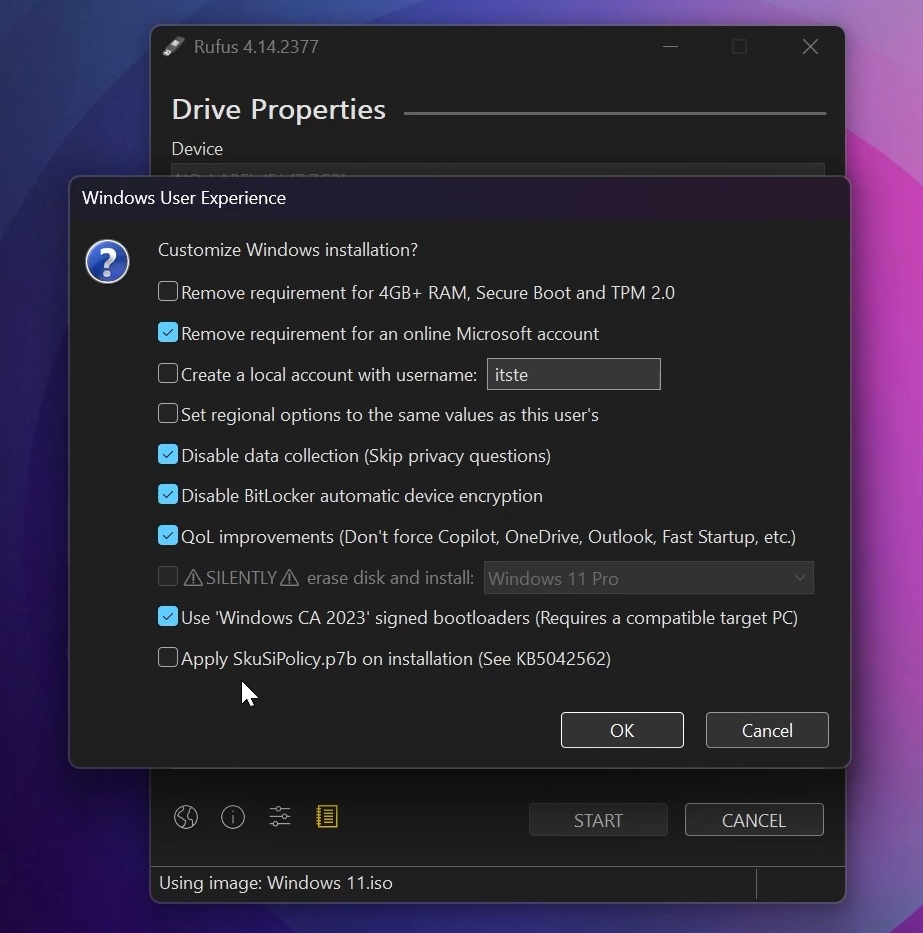
This is how I personally create my USB Drives, but you can customize the options to your liking. These are the options that I selected:
- Remove requirement for an online Microsoft account
- Disable data collection
- Disable BitLocker automatica device encryption
- Quality of life improvements (Don’t force Copilot, OneDrive, Outlook, Fast Startup etc.)
- Use “Windows CA 2023” signed bootloaders
After you customize your Bootable USB Drive, make sure to click on OK and the USB will be created.
For a more in-depth tutorial, you can watch the video below from the youtube channel.
 11
11
 20
20

