
In this article, we will talk about the latest Preview Build for Windows 11 26H2 in the Dev Channel, which is the Build 26340.9233.
Windows 11, version 26H2 represents Microsoft’s yearly second half major update as part of their standard annual Windows 11 update cadence. As Windows 11, version 26H2 shares the same servicing branch as Windows 11, version 25H2, the update is implemented through an enablement package (eKB). This means your device will be updated to the next version through a single restart – providing a familiar, fast, and reliable update experience.
Devices already enrolled in the Experimental channel will begin seeing their versioning updated to version 26H2 under Settings > System > About (and winver). If you are in the Beta channel and would like to switch to the Experimental, you can easily do so under Settings > Windows Update > Windows Insider Program. Remember, you can easily switch back to Beta at any time, without having to do a full Windows reinstall.
Not currently enrolled in the Windows Insider Program and wanting to preview version 26H2? Register for WIP selecting the Dev channel, while it’s transitioning to Experimental. Once the transition is complete, the new channel name to preview version 26H2 will appear as Experimental.
New AutoPlay Dialog
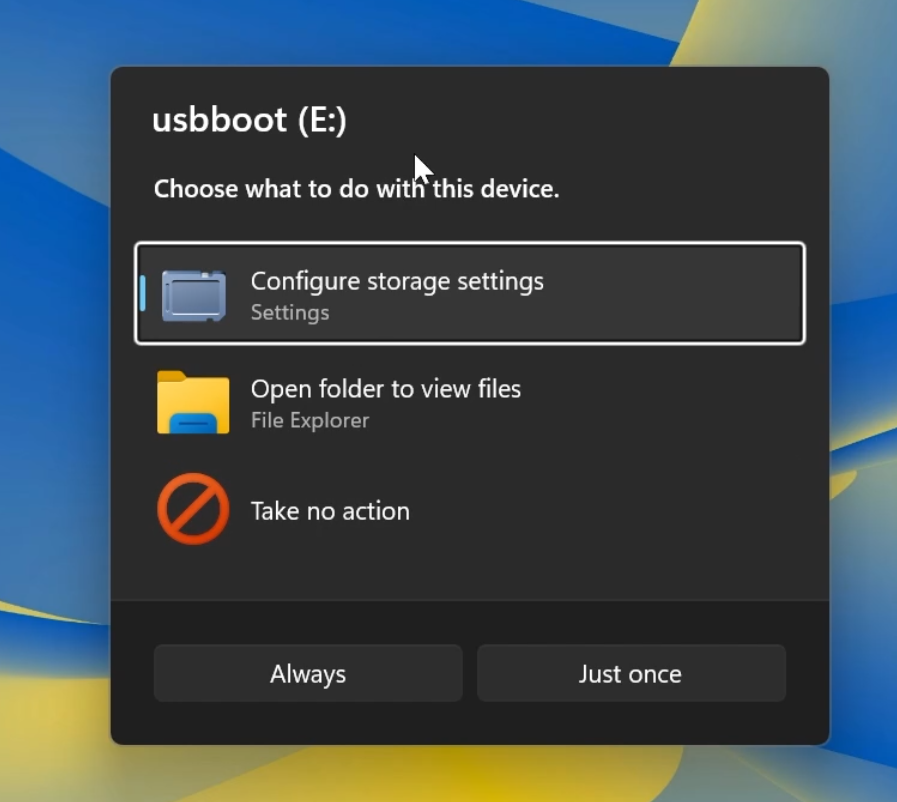
Microsoft is adding a New AutoPlay Dialog that is completely redesigned using WinUI3 and that supports Dark Mode.
New Maximised Apps by Default
Microsoft is also introducing a new accessibility setting, Open apps maximized, that automatically maximizes app windows when they open, so you no longer have to do it yourself every time.
To turn it on, go to Settings > Accessibility > Visual effects, and turn on Open apps maximized. Once enabled, Windows maximizes app windows for you as they open.
Manage Camera and Microphone Access to Desktop Apps
Windows Insiders can now manage camera, microphone, and location permissions for individual desktop apps. Previously, access for traditional desktop applications was managed through a single device-wide setting.
New Wi-Fi Power Saving Energy Recommendation
Microsoft is also adding a New Wi-Fi Power Saving Energy Recommendation that is good especially for Laptops.
New Modern Mouse Indicator
New File Explorer File Previews
PDF and non-HTML files downloaded from the web can now be previewed automatically in the preview pane.
New Microsoft Store Update
This update provides support for in-app purchases in packaged WinUI 3 apps that require elevation, helping developers offer purchases through Microsoft’s integrated commerce platform.
Taskbar Fix
Fixed an issue in the latest builds causing taskbar animations to briefly work and then stop working.
Input Fix
Fixed an issue in the latest builds causing the mouse cursor not to be visible in certain apps.
Feature Flags Fix
Fixed an issue from the last flight causing Settings > Windows Update > Windows Insider Program > Flags to appear empty even though flags were available.
Other Fixes
Updated Settings > Apps > Installed apps to show the version number at the top level for packaged apps, as it already does for other apps.
For more information about this Build, you can check this article from the Microsoft Blog.
For a more in-depth presentation of the New Build, you can watch the video below from the youtube channel.
 11
11
 20
20


Pingback: New Windows 11 26H2 Modern Mouse Indicator (How to Enable) - Tech Based