
In this article, we will talk about the Windows 11 26H2 Release, how to install using Windows Update and New Features.
On the 29th of September 2025, Microsoft has released the 2026 Update or the 26H2 Version for Windows 11.
Useful Information about Windows 11 26H2
Windows 11, version 26H2 represents Microsoft’s yearly second half major update as part of their standard annual Windows 11 update cadence. As Windows 11, version 26H2 shares the same servicing branch as Windows 11, version 25H2, the update is implemented through an enablement package (eKB). This means your device will be updated to the next version through a single restart – providing a familiar, fast, and reliable update experience.
How to Install
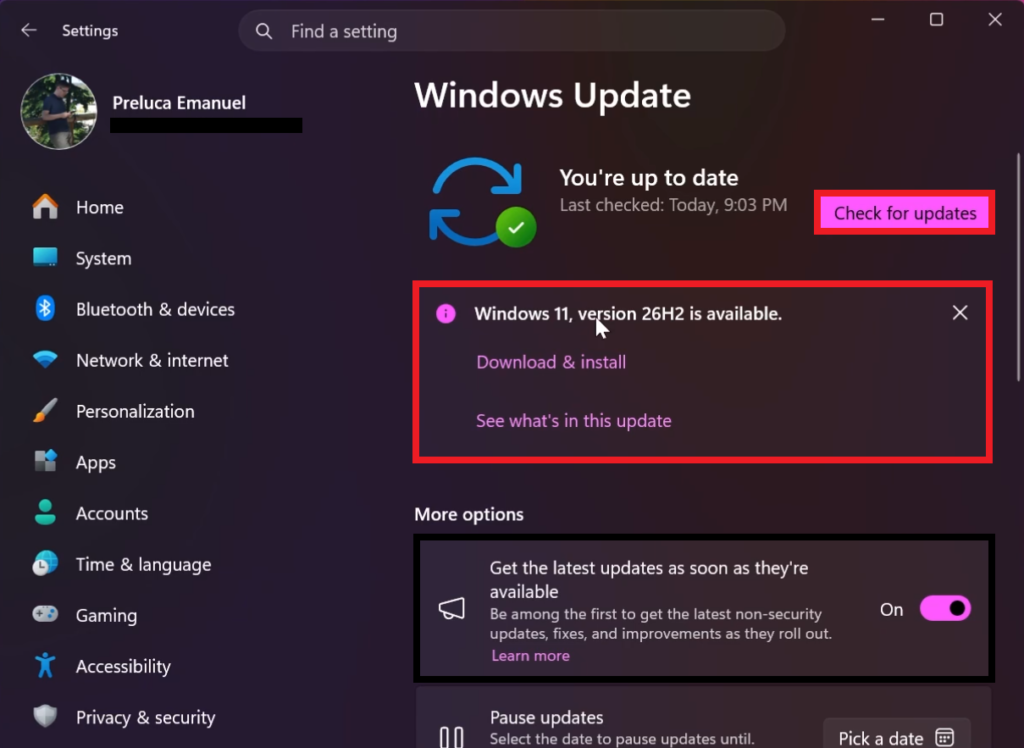
To install the New Version, assuming you are eligible for the upgrade, you need to open the Settings App, go to Windows Update, select Get the latest updates as soon as they’re available and then click on Check for updates.
A banner should appear, stating the Windows 11, version 26H2 is available and then you can click on Download & install.
New Features in this Release
If you want to check all the New Features, that are being released in Windows 11 26H2, you can check this article from our website.
For information related to Windows 11 26H2, you can also check the Official Microsoft Blog Post or Microsoft’s Announcement on X.
For more information about the Windows 11 26H2 Release, you can watch the video below from the YouTube channel.
 11
11
 20
20

